
faw

swe

Claude Code interface

Claude Code workflow

1 month and $4,016.42 later

Claude Code after 1 month and $4,016.42

July 27, 2025

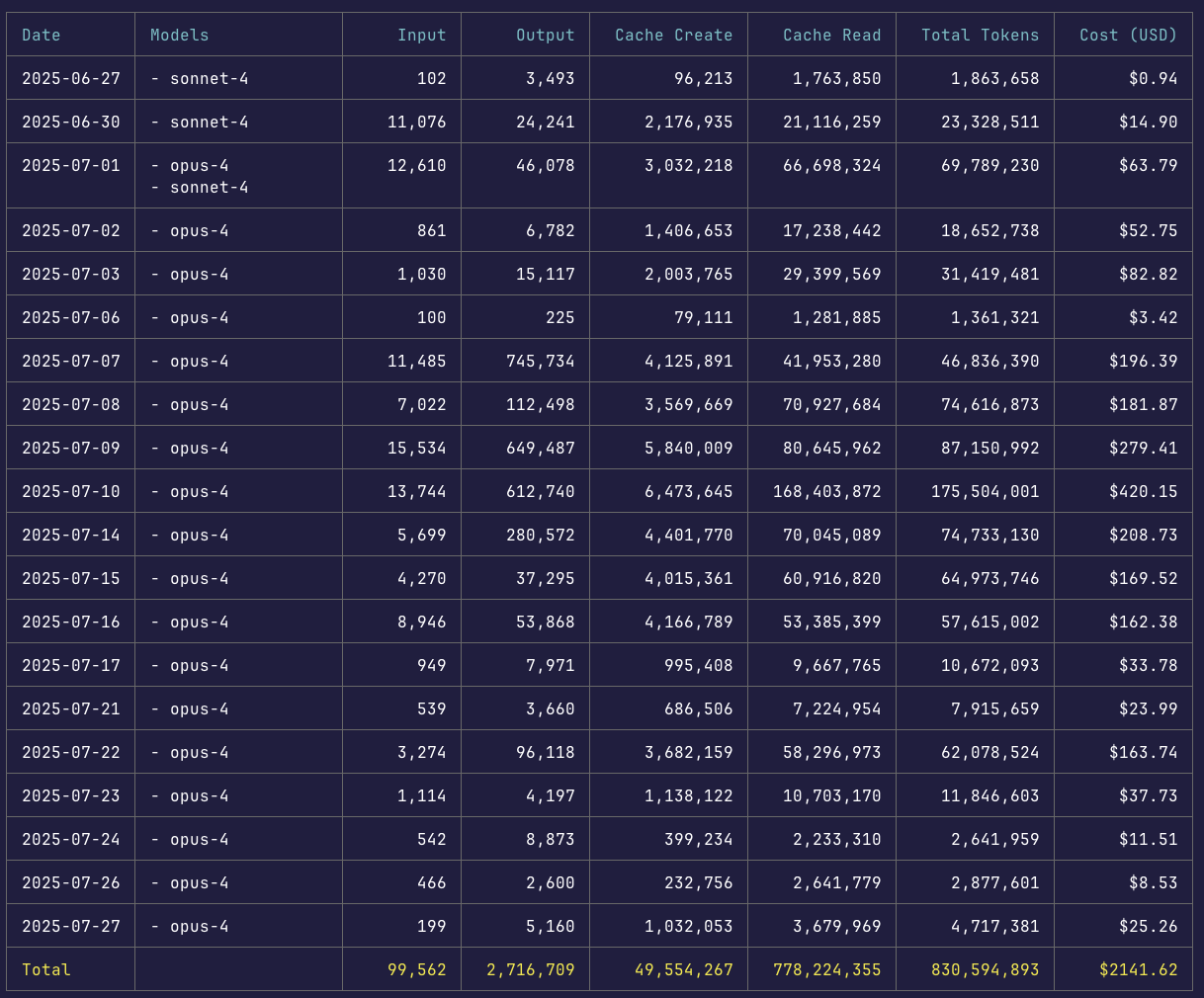
I spent $4,016.42 worth of API calls on Claude Code in one month. Thanks to the Max plan, I only paid $200.

After 1 month with Claude Code, here's what I learned.

What Claude Code Actually Is

Claude Code is Anthropic's command-line tool for AI-assisted coding. It's a thin wrapper around the Claude model that lets you interact at a very low level. No IDE integration, no fancy UI - just a terminal interface that reads files, writes code, and executes commands.

This minimal approach feels surprisingly freeing. You talk directly to the model without layers of abstraction, and the performance beats more integrated tools. The model sees your full codebase and acts on it directly.

Check out the official documentation for setup details, and the recent SDK announcement if you want to build on top of it.

The Numbers

  • Total API usage: $4,016.42
  • What I paid: $200/month (Max plan with 20x usage)

The Max plan changes the economics entirely. That $4,016.42 in API calls cost me $200.

Core Strengths

Context Awareness at Scale

Claude Code processes your entire codebase to understand patterns and conventions - but here's how it actually works: just like a developer would, Claude uses grep commands to find relevant files and patterns. It spins up temporary subagents through Task tool calls. These subagents find what's needed, then pass that information back to the main agent. This keeps the main context clean while still gathering broad codebase knowledge.

When I asked it to add error handling to an API endpoint, it found my existing error handler utility, matched our error message format, used appropriate status codes based on similar endpoints, and updated the API documentation.

The CLAUDE.md File

CLAUDE.md files keep things consistent. Use /init to generate one with codebase documentation, then customize it. Place this in your project root, and Claude references it in every interaction:

# Key Commands

- npm run dev - Start development server
- npm run check - Typecheck + lint (run before commits)
- npm run test:single - Test single file (faster than full suite)

# Architecture Notes

- We use server components by default
- Client components only when needed for interactivity
- All API routes follow /api/v1/[resource] pattern
- Database queries use Drizzle, not raw SQL

# Style Guide

- No semicolons (Prettier handles this)
- Prefer early returns over nested ifs
- Comment WHY, not WHAT

Claude then writes code matching your conventions from the start.

Complex Refactoring

Migrating authentication from sessions to JWTs with backward compatibility. Traditional timeline: three days. Claude Code: four hours.

Me: Migrate our auth from sessions to JWT. Keep backward compatibility for 30 days.

Claude: *reads 47 files*
        *creates migration plan*
        *identifies risk areas*
        *waits for approval*

Me: Proceed with the implementation.

Claude: *updates auth middleware*
        *modifies 23 API endpoints*
        *implements compatibility layer*
        *updates test suite*
        *runs all tests*
        *fixes discovered issues*
        Complete. All tests passing.

The Three-Agent Maximum

After extensive testing with parallel agents, I recommend no more than three running at once.

When multiple agents pass information between each other, context gets lost, and their outputs conflict. I learned this the hard way when I deployed 7 subagents to write test cases for a legacy project. Half the tests followed one format; the other half used a completely different approach.

The core issue is implicit decisions. Parallel agents each make small choices - coding style, variable naming, architectural patterns - that clash when combined. Claude Code tries to mediate these conflicts, but you need extremely specific instructions in your plan.

Insights from Context Engineering

Building on Walden Yan's research on context engineering, here are the principles I've found most useful:

The telephone game kills agent systems. Every handoff between agents loses context. What starts as "implement user authentication with OAuth" distorts more with each pass.

Context is king, not prompts. Models are already smart enough. The limitation isn't clever prompting - it's how much context the model has about your task and previous actions. A mediocre prompt with complete context beats a perfect prompt with partial context.

We're in the HTML era of agent design. Current frameworks are premature - we're still discovering the fundamental principles, like web development before React. Today's patterns will look primitive in hindsight.

Good systems feel like one consciousness. However complex the underlying components, a well-engineered agent system presents itself as a single, coherent entity.

Context compression is necessary but dangerous. Growing tasks hit token limits, forcing you to compress context. Important details get lost. Plan for this from the start.

Universal tools beat specialized ones. Give your agents general-purpose tools like shell access rather than narrow integrations. A bash command with an API key can do almost anything.

Linear workflows consistently outperform parallel ones. A single agent aware of all previous decisions produces better results than multiple agents with partial context. If you must go parallel, limit it to read-only tasks like documentation searches or approach analysis.

For parallel workflows, try the conductor pattern: one agent creates a plan (o3 excels here - it creates logical, rigid plans), a second reviews it for correctness and overengineering, then the first implements the approved plan.

Practical Workflows

1. Environment Setup

Create a CLAUDE.md file. The /init command generates a starter, but customize it for your needs.

2. Explore-Plan-Code-Commit

You: Analyze the user authentication system and document how login currently works.

Claude: *explores relevant files and documents findings*

You: Based on that analysis, create a plan to add OAuth without disrupting existing users.

Claude: *develops implementation strategy*

You: Execute the plan, but hold off on committing.

Claude: *implements changes and runs tests*

You: If everything passes, create a descriptive commit.

3. Be Specific

Vague: "Add user management"

Better: "Create user management following PostList.tsx pattern. Include pagination, search, role filtering, and bulk actions. Use our standard data table component."

4. Reset Context Often

Run /clear between distinct tasks. The context window fills up, and irrelevant information degrades performance.

Limitations

Usage Management

The Max plan's 20x limit requires strategy. Batch related tasks instead of making isolated requests. Five UI tweaks become one session.

Hallucinations

Claude sometimes invents modules. Last month it conjured @/lib/quantum-cache with detailed explanations of "advanced caching strategies." Always verify imports.

Scope Creep

A simple bug fix can balloon into a full refactor. Use explicit constraints: "Fix ONLY the error handling in lines 42-47. Make no other changes."

The SDK

The Claude Code SDK opens up custom integrations:

  • Git hooks for automated code review
  • PR descriptions from actual diffs
  • Business logic-aware linting
  • Test generation from implementations

Should You Use It?

Yes if you:

  • Ship features independently
  • Prioritize velocity
  • Have good test coverage
  • Can adapt workflows

No if you:

  • Work on safety-critical systems
  • Have tight budgets
  • Need absolute control
  • Lack adaptation time

The Official Guide

Anthropic recently published "Claude Code: Best practices for agentic coding" which covers optimization techniques in depth. A few highlights worth noting:

The # key shortcut - Press # to give Claude an instruction that automatically gets added to your CLAUDE.md file. Great for documenting commands and patterns as you discover them.

Thinking modes - Ask Claude to plan its approach to a problem. The word "think" triggers extended thinking mode, giving Claude more computation time. These phrases map to increasing thinking budgets: "think" < "think hard" < "think harder" < "ultrathink."

Use ultrathink sparingly - research shows that excessive thinking time leads to overengineering and worse output through "inverse scaling in test-time compute." If the plan seems reasonable, have Claude create a document or GitHub issue with it so you can reset here if the implementation fails.

Custom slash commands - Store prompt templates in .claude/commands/ for repeatable workflows. For example, create a /fix-github-issue command that pulls issue details and implements the fix.

Tool allowlists - Use /permissions to control which tools Claude can use without asking. Add frequent commands like Edit or Bash(git commit:*) to speed up your workflow.

Moving Forward

Six months ago, AI coding tools were toys. Now Claude Code handles production systems. The gap closed fast.

Engineers who learn AI collaboration will outpace those who don't. The advantage: human creativity multiplied by AI execution.

Start with /init on your existing project to generate a CLAUDE.md starter, then customize it. Or write your own from scratch - there's no required format, just document what helps Claude understand your codebase. Try the explore-plan-code-commit workflow. See what happens.


July 27th, 2025